![Laudio_Wordmark_RGB_Color (1)-3.png]](https://7157272.fs1.hubspotusercontent-na1.net/hubfs/7157272/Laudio_Wordmark_RGB_Color%20(1)-3.png)
Some team members have access to both their regular Laudio account and the Admin Portal. These dual users can easily switch between their two accounts and manage access for other admins, if permitted.
How to Switch Between Accounts
-
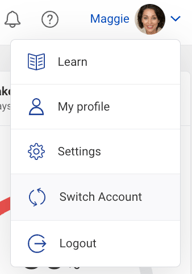
Click your name in the upper-right corner of the screen.

-
Click "Switch Account" from the drop-down menu.
-
Select "User" to move from your Admin account to your standard Laudio account (or vice versa).
Granting Admin Access to Another User
If you are a Laudio Root Admin and have received approval to grant admin access to another user, follow the steps below. This feature is only available to root admins, not regular admins.
-
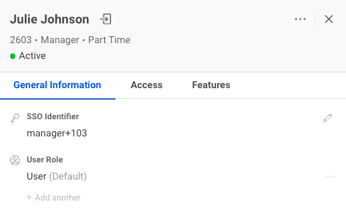
Open the User’s Slideout for the person you want to update.
-
Locate the User Role section.
-
Click “+ Add another” to assign a new role.
-
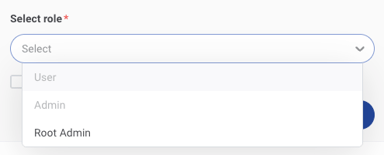
From the dropdown menu, select one or more of the following:
-
User - Leaders who need access to a standard user Laudio account. These are not administrators.
-
Admin - Admins have more limited access, focusing on creating and managing Manager-type users and activating or deactivating them, but cannot manage roles or perform higher-level configurations.
-
Root Admin - Root Admins have full access to all administrative actions, including creating and managing admins, users, and roles, configuring client settings, impersonating users, and viewing termed team members.
-
-
Click Save to apply the changes.