![Laudio_Wordmark_RGB_Color (1)-3.png]](https://support.laudio.com/hs-fs/hubfs/Laudio_Wordmark_RGB_Color%20(1)-3.png?height=41&name=Laudio_Wordmark_RGB_Color%20(1)-3.png)
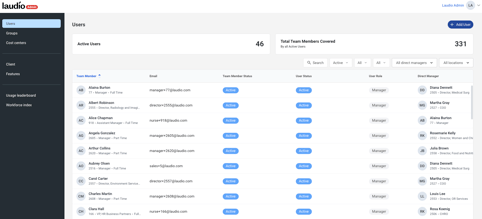
The Admin Portal in Laudio is the central place for Laudio administrators to manage users, configure access, update cost center settings, and control feature availability. It helps simplify account setup, adjust permissions, and keep Laudio settings consistent across the organization.
Key Benefits:
-
Centralized management of all users and roles across the organization.
-
Streamlined configuration of user access and permissions.
-
Customizable control over feature visibility and availability.
What Admins Do in the Admin Portal
Add Users
When a a new leader needs access to Laudio, add them to the platform directly through the Admin Portal. This ensures they have the right access from day one.
Configure Access
Search for any team member and configure their access so that roles such as assistant managers can mirror their manager’s team view or permissions. You can also grant access to specific features, locations for patient rounding, and reporting.
Manage Groups
Create, view, and edit groups of users to streamline administrative tasks. Groups can represent departments, facilities, or specific role types helping admins manage access and feature settings for multiple users at once.
Turn Features On or Off
Control which Laudio features are available to your organization. For example, if a separate tool is used for audits, disable audit features to reduce confusion for end users.
Manage Templates
Add or edit templates to create organization-wide configurations that ensure consistency and efficiency.
Definitions
Team Member
A member of the organization imported via HR File integration.
-
Active – An active member of the organization.
-
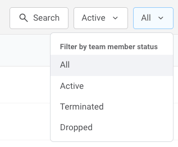
Terminated – A team member no longer employed.
-
Dropped – A team member who no longer appears in the HR file.
User
A team member with a Laudio user account.
-
Active – Has active access to Laudio.
-
Deactivated – No longer has active access.
FAQs
Q: Who can access the Admin Portal?
A: The Admin Portal is available only to a limited number of designated admin users. These designated admin users are often in HR or IT.
Q: What if I can’t find a team member in the Admin Portal?
A: Confirm that the team member appears in the HR file import. If they do not, contact your HR system administrator. When you set the team member status filter to “All,” administrators can view every team member included in the HR file.
New users can be added to Laudio from this view by selecting the plus icon next to individuals who do not yet have a “user status.” These team members may also need to be provisioned as new users if they require access.
If a team member previously appeared in the HR file but no longer does, their team member status will be listed as “Dropped.”
Q: What if I need to be created as an admin user?
A: Reach out to an existing admin at your health system or email support@laudio.com. We’ll help coordinate the required approvals to add you as an admin if appropriate.