![Laudio_Wordmark_RGB_Color (1)-3.png]](https://support.laudio.com/hs-fs/hubfs/Laudio_Wordmark_RGB_Color%20(1)-3.png?height=41&name=Laudio_Wordmark_RGB_Color%20(1)-3.png)
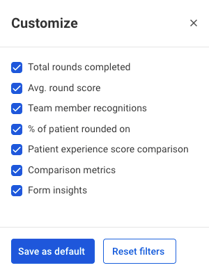
The Customize feature on the Patient Rounding Dashboard lets leaders focus on what matters by displaying key metrics, making it easier to review data.
Key Benefits:
-
Focus on the metrics that support daily responsibilities
-
Hide widgets that aren’t relevant to keep the dashboard clean
-
Save time by reducing the effort needed to analyze data
Steps to Customize the Patient Rounding Dashboard
- Click Patient Rounding on the right-hand side the navigation bar.
-
Click Dashboard.
-
Click Customize in the top right corner.

-
Select or deselect the widgets to show or hide specific data points.
-
Click Save as default to apply the changes to your dashboard view.
FAQs
Q: Do hidden widgets affect data?
A: No. Customizing the dashboard does not affect the data. It only changes which elements are visible.
Q: If I customize my dashboard, will it impact other people?
A: No. Customizations are specific to your view and do not affect other users' dashboards.