![Laudio_Wordmark_RGB_Color (1)-3.png]](https://7157272.fs1.hubspotusercontent-na1.net/hubfs/7157272/Laudio_Wordmark_RGB_Color%20(1)-3.png)
Ignoring recommendations in Laudio helps keep your workflow focused and relevant. When a recommendation isn’t actionable or doesn’t apply to your current priorities, marking it as ignored ensures your dashboard stays clear and meaningful.
Key Benefits
- Keeps your recommendations list uncluttered
- Helps prioritize actionable items
- Improves accuracy of engagement tracking
How to Ignore a Recommendation
- Scroll down to find you Top Recommendations.
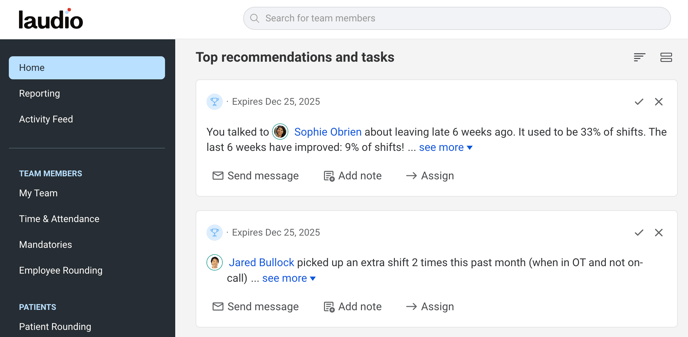
- Locate the recommendation you want to ignore.
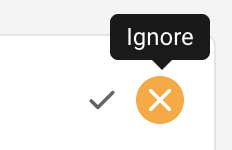
- Click the X icon on the top right of the recommendation.
- Then it will prompt you to select why you've ignored this recommendation.
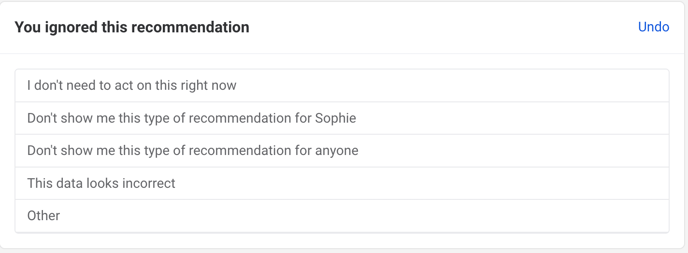
- The recommendation will be marked as ignored and removed from your list of recommendations.
Why It’s Important
- Ignoring irrelevant recommendations helps Laudio learn what matters most to you.
- It prevents unnecessary actions from cluttering your engagement metrics.
- It ensures your focus remains on high-impact activities.
FAQs
Q: Can I undo an ignored recommendation?
A: Yes. After you choose to ignore a recommendation, there will be the option to "Undo" int the top right. You can also navigate to your settings and manage your ignored recommendations there.
Q: Does ignoring a recommendation affect my LAI score?
A: No. Ignored recommendations do not count toward your engagement metrics.