![Laudio_Wordmark_RGB_Color (1)-3.png]](https://support.laudio.com/hs-fs/hubfs/Laudio_Wordmark_RGB_Color%20(1)-3.png?height=41&name=Laudio_Wordmark_RGB_Color%20(1)-3.png)
Within Nudges, you can turn off or snooze nudges for multiple team members at once directly from the Laudio home page, or dedicated Nudges workflow.
Key Benefits
- Fewer clicks to customize nudges for your team
- Make nudges more meaningful by determining which team members they are actionable for
How to Multi-Select Nudge Actions
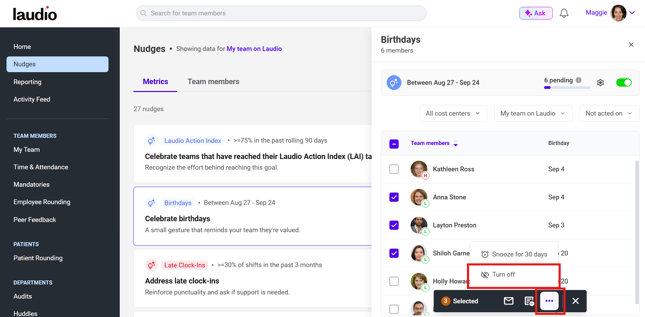
- Select a metric-based nudge from the home page or within the Nudges workflow.
- In the slide-out panel on the right-hand side, you will see the team members for whom the nudge applies.
- Select the team members, or cost centers, that you would like to snooze or turn the nudge off for.
- Once you select at least one team member, actions will appear at the bottom of the panel, allowing you to turn off or snooze the nudge.
Q: What is the difference between turning off a nudge and snoozing it?
A: Turn off: You can turn the nudge off indefinitely or choose a specific date range during which the nudge will not appear for that team member.
Snooze: The nudge will be temporarily paused. By default, it will not appear for approximately one month for that team member.
Q: Is there a way to manage nudge settings in bulk?
A: Yes. Click your name in the upper right-hand corner of the page, and click Settings. Navigate to the Nudge Settings tab. Within this tab, you can select any nudge from the list. On the next page, you can customize nudge visibility by team member and/or cost center. You can also turn a nudges off entirely within your own Laudio instance.