![Laudio_Wordmark_RGB_Color (1)-3.png]](https://support.laudio.com/hs-fs/hubfs/Laudio_Wordmark_RGB_Color%20(1)-3.png?height=41&name=Laudio_Wordmark_RGB_Color%20(1)-3.png)
Key Benefits
- Proactively support team members who are new to your health system
- Send personalized check-in messages with forms to collect feedback
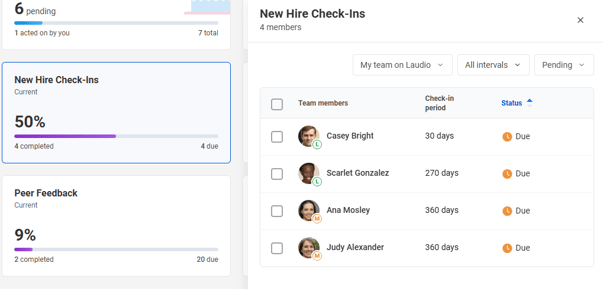
How to Access New Hire Check-Ins
-
On the Homepage, click the New Hire Check-in widget.
-
From here, leaders can filter their view by:
-
My Direct Reports vs. My Team
-
Status (All, Pending, Completed)
-
FAQs
Q: Is there a video that walks me through the New Hire Check-Ins workflow?
A: Yes, a video explanation of this process is available in the Laudio Leadership Lab. Follow this link: New Hire Check-Ins Overview
Q: Who can complete a new hire check-in?
A: Anyone with access to the team member’s new hire check‑in data can complete a it. This is typically done by the employee’s primary or direct manager.
Q: Can I adjust the new hire check‑in intervals?
A: The intervals follow a default cadence in Laudio aligned with best practices. They can be adjusted at the health system level to ensure consistency across teams, alignment with existing processes, and support for organizational goals. For assistance, please reach out to your dedicated Laudio Client Engagement team, or Support@Laudio.com.
Q: Can I use InForms for check‑ins?
A: Yes. InForms are integrated directly into the check‑in process when a new hire check‑in is sent via email.