![Laudio_Wordmark_RGB_Color (1)-3.png]](https://support.laudio.com/hs-fs/hubfs/Laudio_Wordmark_RGB_Color%20(1)-3.png?height=41&name=Laudio_Wordmark_RGB_Color%20(1)-3.png)
The New Hire Check-In Leaderboard helps leaders track and monitor new hire check-ins across their teams. The leaderboard provides visibility into completion trends across facilities, departments, and leaders, helping organizations maintain a consistent onboarding experience.
Key Benefits:
- Monitor new hire check-in completion across teams.
- Identify opportunities for follow-up and support.
- Improve consistency throughout the onboarding experience.
- View onboarding trends across leaders and departments.
Understanding the Leaderboard
The New Hire Check-In Leaderboard includes several reports that help leaders monitor onboarding activity. By default, data includes the current month and the previous three full months.
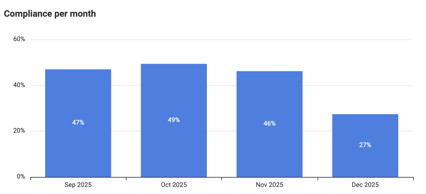
Compliance Per Month
Displays the percentage of completed new hire check-ins compared to the total number due each month. This report helps leaders monitor overall completion trends over time.
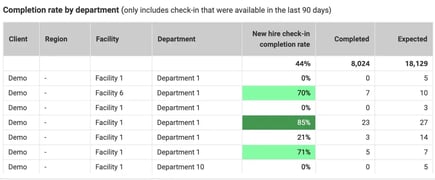
Completion Rate by Department
Displays the percentage and count of completed new hire check-ins compared to the total expected. This report helps identify departments that may need additional focus or support.
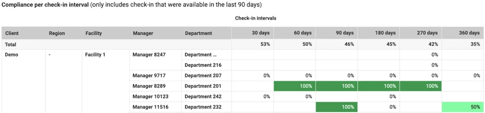
Compliance per Check-In Interval (Manager View)
Displays completed new hire check-ins from the rolling 90-day period, grouped by Facility, Department, Manager, and Check-In Interval. This view helps leaders understand whether onboarding milestones are being completed consistently.
Employee New Hire Check-In Details
Provides detailed information about completed new hire check-ins from the rolling 90-day period. Data can be reviewed by Facility, Department, Manager, and Employee. This report supports detailed review and follow-up when needed.
Using Filters
Use the filter bar at the top of the page to narrow results by:
- Region
- Facility
- Manager Downline
- Check-In Interval
- Time Period
Understanding Visual Indicators
Completion rates are color-coded to help identify performance levels quickly.
- Dark Green - Meeting Target (80% or Higher): Departments or leaders are consistently completing new hire check-ins and meeting onboarding expectations.
- Light Green - Meeting Baseline (50% to 79.9%): New hire check-ins are being completed, but there may be opportunities to improve consistency.
- No Color - Action Required (Below 50%): Completion rates indicate that onboarding check-ins may be missed or delayed and could require additional attention.
Definitions
-
Check-in Date: The date the check-in was completed.
-
Completed: A new hire check-in marked as complete during the selected time period.
-
Due: A new hire check-in scheduled during the selected time period.
-
Email Sent: Indicates whether a check-in reminder email was sent.
-
Expected: The total number of new hire check-ins due for active employees over the past rolling year.
-
InForm Sent Date: The date the check-in email was sent.
-
InForm Responded: The date the employee submitted the check-in form.
-
New Hire Check-in Interval: The onboarding milestone associated with the check-in, such as 30, 60, 90, or 180 days.
-
Response Text: Feedback submitted during the check-in process.
FAQs
Q: What information does the default view show?
A: By default, the leaderboard displays new hire check-in data for the leader's reporting downline.
Q: Who should I contact if I have questions about the report?
A: Contact Support@Laudio.com for assistance.