![Laudio_Wordmark_RGB_Color (1)-3.png]](https://support.laudio.com/hs-fs/hubfs/Laudio_Wordmark_RGB_Color%20(1)-3.png?height=41&name=Laudio_Wordmark_RGB_Color%20(1)-3.png)
The Overtime workflow is part of the Time and Attendance section in Laudio. It is designed to help leaders review trends in incremental overtime, early clock-ins, late clock-outs, and missed breaks across their team.
Key Benefits
- Easily identify team members who may need support with leaving work on time or taking appropriate breaks
- Review trends in incremental overtime across your team
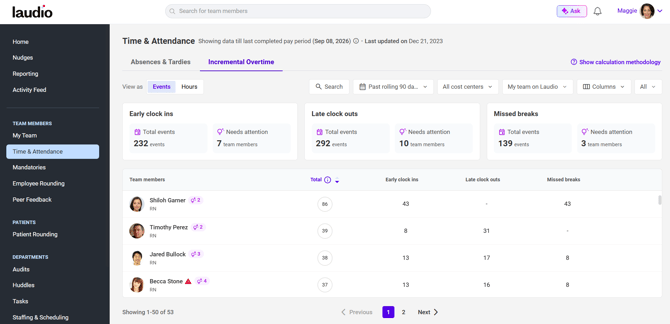
Accessing the Overtime Workflow
- Click Time and Attendance from the left-hand navigation bar.
- Click the Incremental Overtime tab at the top of the page.
FAQs
Q: Is there a way to toggle between events and hours?
A: Yes. There is a filter at the top of the page that allows you to switch between viewing events and hours.
Q: What is the lightbulb icon next to a team member’s name?
A: The lightbulb icon represents nudges, or suggested outreach actions, related to time and attendance that may apply to that team member.
A: The lightbulb icon represents nudges, or suggested outreach actions, related to time and attendance that may apply to that team member.
Q: Can I take action from this page?
A: Yes. If you hover over a team member’s name within the overtime table, you will see options to send an email or add a note to that team member’s profile.
A: Yes. If you hover over a team member’s name within the overtime table, you will see options to send an email or add a note to that team member’s profile.
Q: Can I see more information related to the trends?
A: Yes. If you click into any cell within the table, a pop-up will appear with additional details and trend insights.
A: Yes. If you click into any cell within the table, a pop-up will appear with additional details and trend insights.
Q: Is there a way to view incremental overtime by cost center?
A: Yes. Incremental overtime can be viewed at the cost center level within the Reporting tab in Laudio.
A: Yes. Incremental overtime can be viewed at the cost center level within the Reporting tab in Laudio.