![Laudio_Wordmark_RGB_Color (1)-3.png]](https://support.laudio.com/hs-fs/hubfs/Laudio_Wordmark_RGB_Color%20(1)-3.png?height=41&name=Laudio_Wordmark_RGB_Color%20(1)-3.png)
Performance Insights is a feature that provides frontline leaders with a real-time, dynamic view of team member performance. It helps reduce the time required to prepare for performance conversations and reviews while improving the quality of feedback and coaching.
Using data already captured in Laudio (such as notes, and emails) along with AI-powered categorization and summarization, Laudio create summaries that leaders can use for both annual performance reviews and regular check-ins.
Key Benefits:
-
Organizes activities into performance categories aligned with your health system’s specific performance review categories.
-
Provides dynamic summaries using activities that are documented within Laudio.
-
Helps leaders prepare for reviews and professional development conversations with clear, documented feedback.
Where to Find Performance Insights
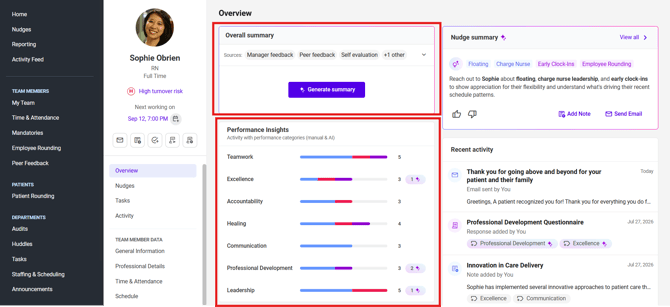
Performance Insights is being rolled out on a client by client basis to ensure each organization’s performance categories are properly aligned and configured. For clients with performance insights enabled, the tool appears on the Overview tab of a team member’s profile as shown below.
Performance Insights includes two summary views: an Overall Performance Summary and HR Pillar-Specific Summaries. Together, these views provide a comprehensive picture of employee performance and can support annual reviews, ongoing coaching, and professional development conversations.
How to Get the Most Out of Performance Insights
- Tag Important Notes and Emails
When writing a note or email, you can add performance categories. This helps make sure key feedback and actions are organized and show up in summaries and reports. - Review AI Suggestions
Laudio’s AI suggests categories based on what’s written in notes and emails. These suggestions can be reviewed and changed if needed to keep things accurate and useful. - Use It Regularly
Use Performance Insights during check-ins, coaching, or when preparing for reviews. The data updates on its own, so there’s no need to track things manually. You can also generate a summary for each category and then copy it into your HR system or adjust the wording as needed. It saves time and keeps feedback tied to real examples.
FAQs
Q: What kind of data does Performance Insights use?
A: Performance Insights leverages activities already documented in Laudio, including emails, notes, InForms (such as Peer Feedback, Employee Rounding, New Hire Check-Ins, and self-evaluations), time and attendance, and more. As additional integrations are introduced, more data sources may be incorporated into the tool.
Q: Can performance categories be customized by role or department?
A: No. Right now, categories are set at the health system level and apply across all roles.
Q: Does this replace performance reviews in our HR system?
A: No. This tool supports the review process - it doesn’t replace it. Leaders can use the insights and summaries from Laudio to make writing reviews faster and more holistic.
Q: Why don’t all notes or emails have AI-suggested categories?
A: AI suggestions only appear when the content clearly relates to performance. Some messages may not have enough context to be categorized.
Q: Can I edit or remove an AI-suggested category?
A: Yes. You can change or remove a suggestion anytime by going into the detail view.
Q: How does my health system get started?
A: Reach out to your Laudio representative. They’ll help your organization define performance categories, test the feature and enable it for all leaders.
Want to Learn More? Click Here.