![Laudio_Wordmark_RGB_Color (1)-3.png]](https://support.laudio.com/hs-fs/hubfs/Laudio_Wordmark_RGB_Color%20(1)-3.png?height=41&name=Laudio_Wordmark_RGB_Color%20(1)-3.png)
This feature allows you to send bulk emails to a group of team members while still personalizing each message. By using dynamic fields (like preferred names) and selecting “Send individually,” each recipient will receive their own personalized version of the email.
Key Benefits
- Send one message that feels tailored to each team member
- Boost engagement and save time by reaching an entire group without writing individual emails
Sending Personalized Group Emails
- From the main screen, click Send message to start composing your email.
- Select a message theme (optional)
- Choose your recipients:
- Click Select group to add a group of team members, or
- Manually enter individual names in the recipient field
- To personalize your message, click Insert placeholder.
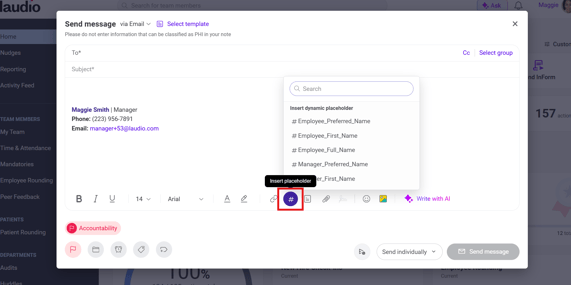
- Click Employee_Preferred_Name (or other dynamic fields) to insert personalized details.
- Continue composing your message as needed
- Select Send individually to ensure each recipient receives a personalized email
- Note: Selecting “Group” will send a single message addressed to the group instead. Group messages will also allow recipients to see other recipients.
- Click Send message to deliver your email
FAQs
Q: What happens if I don’t select “Send individually”?
A: If you choose “Group,” the email will be sent as a single group message and will not include personalized fields for each individual.
Q: What are dynamic fields (Insert placeholders)?
A: Dynamic fields automatically pull in information (like a team member’s preferred name) so each email feels personalized without extra manual work.
Q: Can I still send to individuals instead of a group?
A: Yes - simply enter names directly into the recipient field instead of selecting a group.
Q: Can I use the dynamic placeholders with email templates?
A: Yes. These can be used in emails drafted in real time, and in templates.