![Laudio_Wordmark_RGB_Color (1)-3.png]](https://support.laudio.com/hs-fs/hubfs/Laudio_Wordmark_RGB_Color%20(1)-3.png?height=41&name=Laudio_Wordmark_RGB_Color%20(1)-3.png)
Tags help organize work in Laudio by adding labels to emails, notes, and tasks. Using tags makes it easier to categorize activities and review work later.
Key Benefits:
- Organize emails, notes, and tasks with consistent labels.
- Quickly filter and sort activity exports by tag.
- Track work associated with organizational values, priorities, or pillars.
Adding a Tag
1. Create or open an Email, Note, or Task in Laudio.
2. Locate the Tags field. For instance, this is where the field is located when adding a Note.
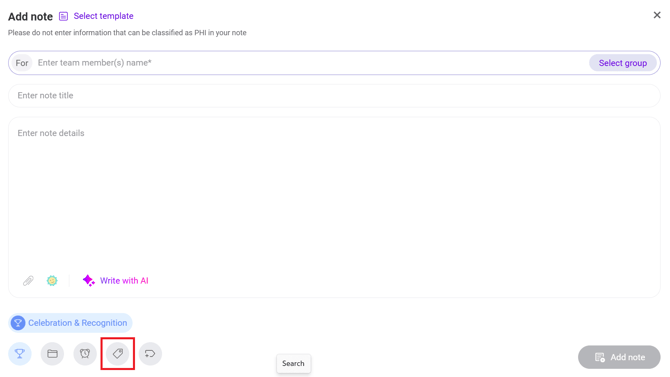
3. Select one or more tags from the available list.
Using Tagged Content
Tagged content can be used when reviewing exported Laudio activity logs. After exporting activity data:
1. Open the exported file.
2. Filter or sort the data by the Tag column.
3. Review activities associated with specific categories, values, or initiatives.
- This can help frontline leaders quickly find examples of work completed throughout the year.
FAQs
Q: Can an organization use organization-specific tags?
A: Yes. Organizations can work with the Laudio team to create and upload custom tags that reflect organizational values, pillars, initiatives, or other priorities.