![Laudio_Wordmark_RGB_Color (1)-3.png]](https://support.laudio.com/hs-fs/hubfs/Laudio_Wordmark_RGB_Color%20(1)-3.png?height=41&name=Laudio_Wordmark_RGB_Color%20(1)-3.png)
The Mandatories page helps leaders move from awareness to action once due or overdue compliance items are identified. In a single Laudio view, leaders can see what needs follow up, communicate directly with team members, and review detailed compliance information to support timely action.
Key Benefits:
-
Quickly contact team members with outstanding compliance items.
-
Understand exactly which items need attention.
-
Reduce back and forth by sharing clear, consolidated information.
Ways to Take Action
-
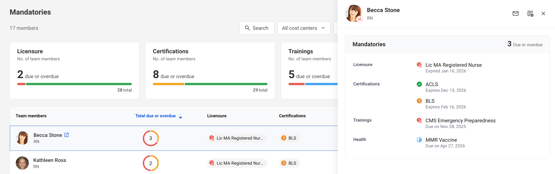
Identify Team Members Needing Follow Up - Review the compliance summary widgets and the team member table to locate individuals with due or overdue items.
-
Expand a Team Member’s Details - Click a team member to open the expanded compliance view. This view shows all related items, including completed and in progress requirements, providing full context before reaching out.
-
Send an Email - Click Send Message from the Mandatories page to email a team member directly. In the email message, Laudio will compile all due and overdue items for the selected team member. The message is pre-crafted and editable, making outreach both fast and consistent.
-
Review Compliance in the Team Member Profile - Additional compliance details are available in the team member profile under Professional Details.


FAQs
Q: Where does the compliance data come from?
A: Data is synced from external systems such as HR systems, LMS platforms, and employee health systems.
Q: Can messages be customized before sending?
A: The message is pre-crafted for convenience, but can always be reviewed and edited as needed before sending.