![Laudio_Wordmark_RGB_Color (1)-3.png]](https://support.laudio.com/hs-fs/hubfs/Laudio_Wordmark_RGB_Color%20(1)-3.png?height=41&name=Laudio_Wordmark_RGB_Color%20(1)-3.png)
The Laudio Leadership Lab offers on-demand training videos designed to help leaders build knowledge of the platform. Training content can be explored by topic or through guided learning pathways, making it easy to learn at your own pace.
Key Benefits:
-
Convenient, self-paced onboarding and ongoing training
-
Variety of learning paths, courses, and content types
-
Easy access – linked directly from Laudio
How to Access the Laudio Leadership Lab
-
Log in to Laudio.
-
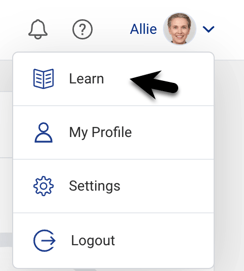
Click the dropdown menu to the right of your name.
-
Select Learn.
-
The Laudio Leadership Lab opens in a new browser window. Because the Leadership Lab opens in a separate window, you can keep Laudio open and apply what you’re learning in real time.
How to Select a Learning Path or Course
-
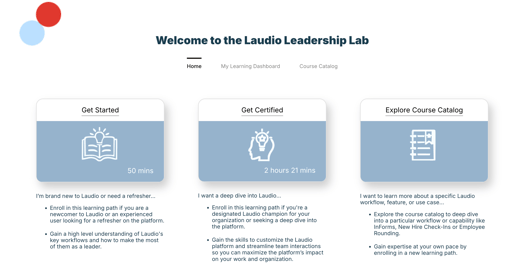
Existing Laudio Users – Click Explore Laudio to browse the course library. Choose a topic (for example, InForms or Audits workflow) to deepen your knowledge.
-
New Laudio Leaders – Click Home and enroll in the Laudio: Get Started learning path. Add more courses from Explore Laudio as needed.
-
Laudio Champions / Super-Users – Click Home and enroll in the Laudio: Get Certified learning path.
FAQs
Q: Can I take more than one course at a time?
A: Yes. You can enroll in multiple courses and learning paths as needed.
Q: Do I need manager approval to access the Leadership Lab?
A: No. All leaders with Laudio access can use the Leadership Lab at any time.
Q: Can I pause and resume a training video?
A: Yes. Videos can be paused and resumed at your convenience.
Q: Why do screenshots in the Leadership Lab look different from what I see?
A: Screenshots in the Leadership Lab may appear slightly different depending on your organization’s Laudio configuration.