![Laudio_Wordmark_RGB_Color (1)-3.png]](https://support.laudio.com/hs-fs/hubfs/Laudio_Wordmark_RGB_Color%20(1)-3.png?height=41&name=Laudio_Wordmark_RGB_Color%20(1)-3.png)
Pending InForm responses can be deleted directly within an InForm. This functionality is designed for scenarios where a pending response is no longer needed. Deleting these responses helps keep InForms current and ensures only relevant requests remain active.
Key Benefits
- Update pending form responses within the InForm itself
- Review pending responses before they are completed
- Delete pending responses when needed
How to View Pending Responses
- Go to InForms.
- Click the specific InForm you want to review.
- Click "Individual Responses".
- In the filters, the default view is "Completed Responses". Change the filter to "Pending Responses".
- Note: You can also use this page to review forms that were sent by you.
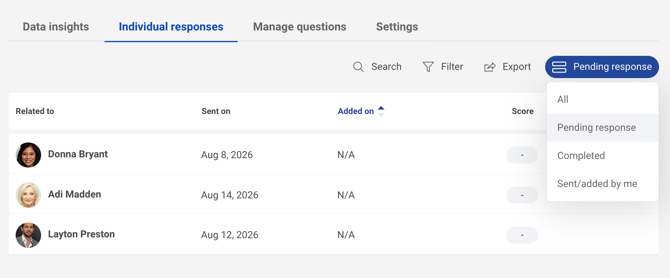
- Note: You can also use this page to review forms that were sent by you.
How to Manage Pending Responses
When viewing pending responses, you can review or delete a pending response from the response table. To take action:
- Go to the "Take Action" column on the right side of the table.
- Click the appropriate icon in that column to choose the right action for the pending response.
FAQs
Q: When should I review or remove a pending InForm response?
A: You may want to review or remove a pending InForm response when the form is no longer needed or applicable. For example, if a form was sent in error, is no longer being used, or a team member has transferred to a different team, the pending response can be removed. This helps ensure team members only receive relevant requests and prevents outdated forms from remaining active.