![Laudio_Wordmark_RGB_Color (1)-3.png]](https://support.laudio.com/hs-fs/hubfs/Laudio_Wordmark_RGB_Color%20(1)-3.png?height=41&name=Laudio_Wordmark_RGB_Color%20(1)-3.png)
The Overtime workflow is part of the Time and Attendance section in Laudio. It enables leaders to quickly review key trends and take action to support team members with leaving work on time, taking appropriate breaks, and addressing patterns of incremental overtime.
Key Benefits
- View early clock-ins, late clock-outs, and missed breaks in a single, centralized table with the ability to take action
- Review time and attendance trends at the team member level
How to Use the Overtime Workflow
- Click Time and Attendance from the left-hand navigation bar.
- Click the Incremental Overtime tab at the top of the page.
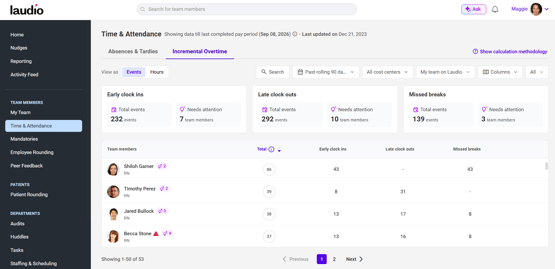
- Use the filters at the top of the page to customize the table view.

- Hover over a team member’s name to send a personalized email or add a note to their profile.

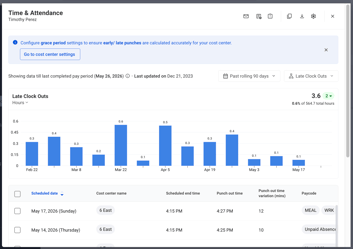
- Click into any cell in the table to view detailed, team member–specific trend data.
FAQs
Q: It looks like the grace period settings are not correct. What should I do?
A: Some health systems manage global grace period settings. If your health system allows individual customization, you can update these settings at the cost center level within your general Laudio account settings. This helps ensure early and late punches are calculated accurately for your cost center.
Q: Can I ignore a specific time and attendance event?
A: Yes. Click into a cell within the table to view event details. From there:
- Hover over any event and select Ignore on the right-hand side
- Select multiple events using the multi-select option to ignore them in bulk