![Laudio_Wordmark_RGB_Color (1)-3.png]](https://support.laudio.com/hs-fs/hubfs/Laudio_Wordmark_RGB_Color%20(1)-3.png?height=41&name=Laudio_Wordmark_RGB_Color%20(1)-3.png)
Ways to Get the Most Out of Performance Insights
- Tag Activities Intentionally - Adding performance categories helps highlight key moments and trends over time.
- Manually add performance categories to notes, emails, or InForm responses.
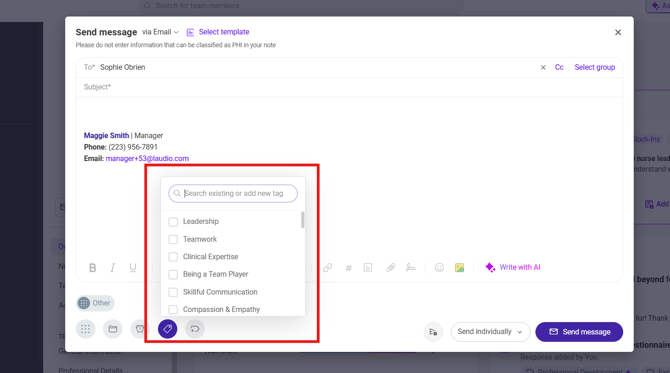
- Tag important events, achievements, or concerns as they happen.
- Use tags consistently so insights surface clearly during reviews.
- Manually add performance categories to notes, emails, or InForm responses.
- Review and Verify AI Suggested Categories - Laudio’s intelligent platform suggests performance categories to help streamline documentation.
- Review AI suggested categories before saving.
- Reject suggestions that do not fit the context.
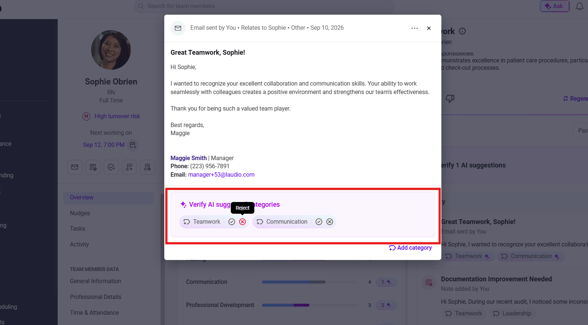
- Adjust tags as needed to maintain organized and reliable data.
FAQs
Q: What kind of data does Performance Insights use?
A: Performance Insights leverages activities already documented in Laudio, including emails, notes, InForms (such as Peer Feedback, Employee Rounding, New Hire Check-Ins, and self-evaluations), time and attendance, and more. As additional integrations are introduced, more data sources may be incorporated into the tool.
Q: Do I have to use AI suggested categories?
A: No. AI suggestions are optional and can be edited or rejected at any time.
Q: Why is tagging performance insights important?
A: Tags make it easier to surface key moments during reviews and understand performance trends over time.